Add Acid Bot to your Discord server
Click that link: https://discordapp.com/oauth2/authorize?client_id=477429627799863303&scope=bot&permissions=183296
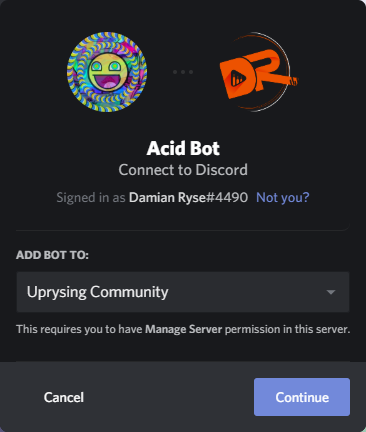
- Select the server you wish Acid Bot to connect to and click on continue.
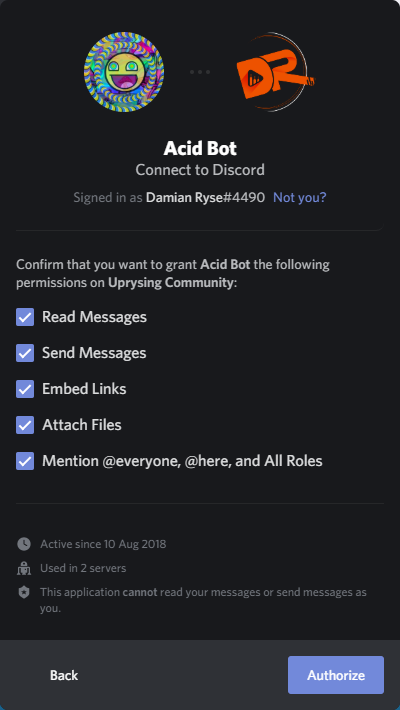
- Confirm the permissions for Acid Bot and click the „Authorize“ button.
 |
 |
|---|
Create a text channel for Acid Bot
I recommend you to add a text channel dedicated to Acid Bot. There are some notifications and information the bot will post only if a dedicated bot channel has been set up. It is also recommended that this channel is only visible for the bot, for you and the dedicated Bot administrator role (if any).
To assign the new channel to Acid Bot, simply type
!set-botchannel #channel-name
Configuring the basics
For some features, the bot requires to know some things about you and your Twitch stream.
Your local time zone
!get-timezones
Enter this command to get a file containing the available time zones. The file can be opened with any text editor such as Notepad, Notepad++, Sublime or whatever you prefer. Find the timezone you are living in, for example Europe/Berlin.
!set-timezone Your/Timezone
This will save your new timezone.
Twitch name
!set-twitch YourTwitchName
This simple command will configure your own Twitch stream name. Replace YourTwitchName with your actual Twitch name.
Auto promotion
!set-promotionchannel #channelName
With this command, you can assign a channel for automated twitch promotions of your friends! After you added some channels, Acid Bot will post a notification in this channel when they go live on Twitch.
You can add and remove Twitch channels with these commmands:
!add-twitch MyFriendsTwitchName
!remove-twitch NotAFriendAnymoreTwitchName
And finally, you can turn the whole thing on and off with:
!ttp
But remember: When you configured your own Twitch name and you are currently live on stream, Acid Bot will not do any automated promotion as long as you are live by yourself.
And that’s it for the basics! Acid Bot is now set up and ready to do magic!
There are more advanced settings available and of course some other cool and fun !commands for you and your Discord members! Check them out at: https://www.sp-dev.eu/acid-bot-commands/